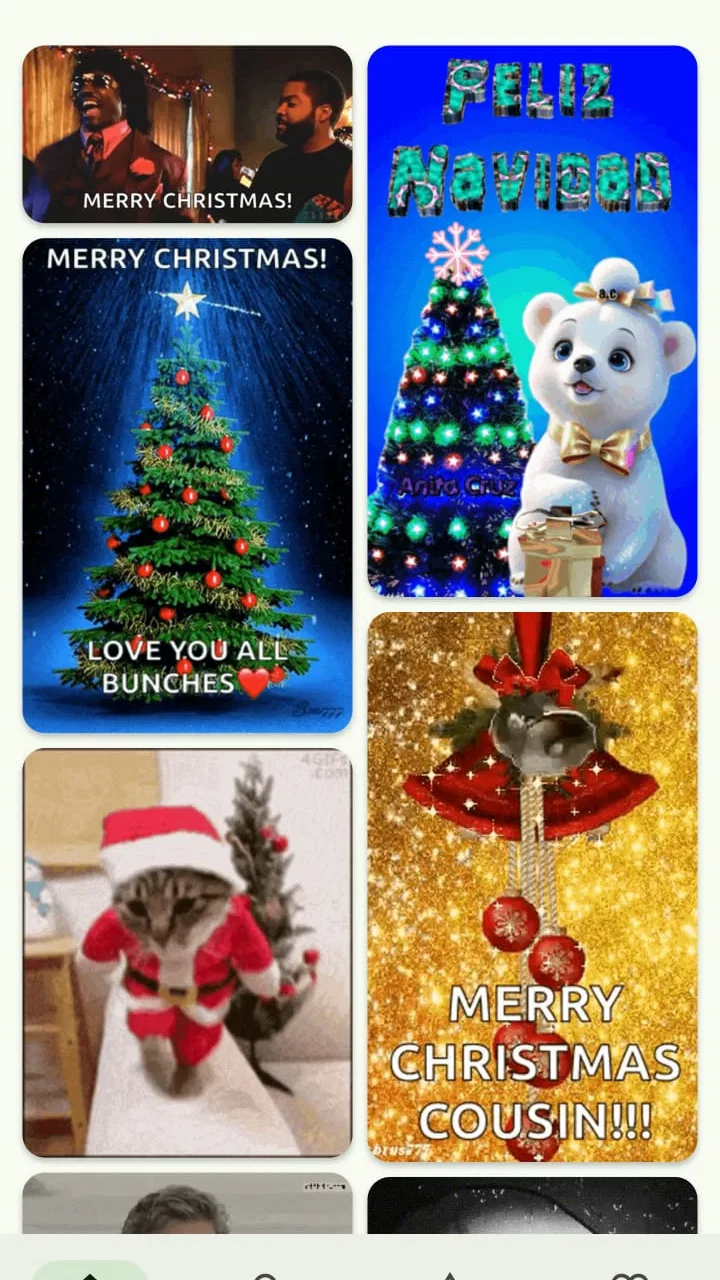
GIF Keyboard: What’s a Gif
- 4.1
- Rating
- 500.00K
- Installs
- Free
- Price

 Analysis by App-foxy
If you regularly pause a conversation because the perfect reaction is a GIF rather than a sentence, GIF Keyboard: What’s a Gif is built around that small everyday problem. I reviewed it as a free comics app from OSmart Apps, and its main idea is straightforward: search for animated reactions, bring them into a conversation, and save or share the ones you want to use again. It is aimed at people who communicate through humor, memes, and quick visual responses rather than long explanations.
The first thing I noticed is that this is not really a reading-focused comics app. It works more like a GIF keyboard and search tool, with funny memes and short animated images at the center. That distinction matters. If you want panels, serialized stories, or a library of traditional comics, this is the wrong category of experience. If you want a faster way to find an expressive reaction while chatting, its purpose becomes clear almost immediately.
Its current version is 3.0.2, and it runs on Android 7.0 or later. The app is free to install, with in-app purchases listed at $0.99 per item. It carries a Teen content rating, which fits the unpredictable nature of internet-style humor: not every meme or reaction will suit every conversation, workplace, or younger audience.
You May Also Like

 Blood Strike: 2.5 Anniversary
Blood Strike’s Loadouts Turn Every Drop Into a Tactical Gamble
A close look at Blood Strike’s custom loadouts: how fast access to signature weapons reshapes its battle royale rhythm, rewards preparation, and narrows the gap between fights.

 Pandora - Music & Podcasts
Pandora’s Music Is Easy to Start, but Harder to Recover
Pandora’s strength is its low-effort path from a seed to a station. Its weak spot is how much confidence it asks you to place in connection, setup, and quiet recovery.

 8 Ball Pool
 Is Built on Rivalries, Rematches, and Routine
A close look at the rivalries, rematches, shared routines, and unanswered safety questions that turn a quick pool match into a persistent mobile community.

 Samsung Music
’s Quiet Strength Is Playing What You Already Own
Its reach comes less from spectacle than from dependable access to a personal library. That simplicity is both the app’s strongest retention engine and its ceiling.

 AccuWeather: Weather Radar
AccuWeather Review: A Quick, Clear Forecast for Everyday Decisions
For everyday plans, the best forecast is the one you can understand quickly. AccuWeather makes rain timing, radar, and local conditions easy to act on, with a few trade-offs.

 Hill Climb Racing
Why Hill Climb Racing Still Turns Crashes Into One More Run
A tiny car, a bumpy hill and one more upgrade: Hill Climb Racing keeps resurfacing because its simple chaos makes every near-miss feel personal.
More From Our News Desk
View All News


What to expect before you start searching
I would approach this app as a practical reaction tool, not as a carefully organized entertainment catalog. The appeal is speed. You think of a mood, phrase, celebrity expression, or joke, enter a search, and look for something that communicates the feeling better than a standard emoji. That makes it especially useful in group chats, casual messages, social replies, and conversations where tone can otherwise be misunderstood.
The store summary presents it as a way to search, save, share, and download funny memes. In use, those actions suggest a simple workflow: discover something, decide whether it fits the moment, then either send it immediately or keep it for later. I like that this gives the app more value than a one-time GIF search. A reaction you enjoyed today can become part of your personal collection for future conversations.
There is also a useful difference between sending a GIF and sending a written reaction. Text such as “that is unbelievable” depends heavily on context, while a well-chosen animated expression can make the intended tone obvious. The trade-off is that visual humor is more specific. A GIF that works perfectly with one friend may feel confusing or excessive in a professional chat, so the app rewards judgment rather than indiscriminate sharing.
The rating sits at a 4.1 average from around 3.5 thousand ratings, and the app has passed half a million installs. I read that as a sign that the basic idea is easy for many people to understand, while the experience will still depend on whether the available search results match your sense of humor and the messaging apps you use.
The best fit for reaction-heavy conversations
I think the strongest audience is someone who already uses GIFs but dislikes leaving a chat, opening a separate search page, downloading an image, and then returning to the conversation. The keyboard approach can reduce those interruptions. It is also a good fit for people who prefer visual humor to stickers, because GIFs can express timing, surprise, embarrassment, celebration, or sarcasm with more movement than a static image.
It is less suitable for anyone who wants a polished, tightly curated collection with dependable results for every search. Search-based GIF tools can be hit or miss: a broad phrase may produce too many unrelated options, while a very specific request may not return the exact reaction you imagined. I would also skip it if you rarely send animated media or if your main priority is a quiet, distraction-free keyboard.
Getting through the first setup without confusion
After installing it, my advice is to begin with a low-pressure test rather than immediately trying to use it in an important conversation. Open a message draft in an app you already use, bring up the keyboard, and look for the GIF or search option associated with the installed tool. The exact appearance can vary depending on the phone and messaging app, but the goal is simply to confirm that you can reach the search interface when the keyboard is visible.
This first check answers the question many new users have: “Where is the app after installation?” Because it is designed as a keyboard, it may not behave like a normal standalone comics reader that you open and browse for a long time. Look for it through the keyboard selection or input controls on your device. If you only search for a conventional app icon, you may assume nothing happened even though the useful part is available from text entry.
Once the keyboard is accessible, start with a broad emotional idea such as laughter, surprise, confusion, celebration, or approval. These are better first searches than a complicated sentence because they help you understand how the results are grouped and how quickly you can scan them. I would avoid judging the app from one overly precise query. The first meaningful success comes faster when you search by mood and then refine your choice visually.
There is one setup habit worth adopting early: test the complete path from search to message before building a large collection. Select a result, check how it appears in the draft, and decide whether it sends as an animation, an image, or through another sharing step in your messaging app. That small test prevents an awkward surprise when you are trying to reply quickly. It also tells you whether a particular conversation supports the format comfortably.
Privacy and control are worth considering whenever a keyboard is involved, even when your main interest is humor. I would read the device’s keyboard-related prompts carefully and only enable the input method when I understand what I am selecting. The app’s Teen rating is another reason to keep context in mind. Search results can be funny without being appropriate for every audience, so I would not hand the phone to a child assuming that every result is suitable.
Your first successful GIF workflow
For a first real test, imagine a friend sends a message saying they have just made an obvious mistake. Instead of typing a long reply, open the GIF keyboard, search for a reaction connected to embarrassment or disbelief, and scan the results for one that communicates friendly teasing rather than genuine criticism. Tap the choice, verify the preview in the message field, and send it. That is the moment the app proves its value: the response becomes quicker and more expressive than composing the same feeling in words.
I recommend choosing a result based on tone before choosing it based on how funny it looks. A dramatic reaction can be entertaining but may accidentally sound angry. A small, recognizable expression often works better in ordinary conversations because the recipient understands it without needing extra explanation. This is one of the app’s less obvious skills: successful GIF use is not only about finding something amusing; it is about matching intensity to the relationship.
Saving is most useful after this first experiment. If you find a reaction that fits several situations, keep it rather than relying on memory or repeating the same search. I would create a personal mental system based on use rather than subject: one group of reactions for congratulations, one for awkward moments, one for disbelief, and one for playful agreement. Even without a formal folder structure, thinking this way makes the saved collection faster to use.
Sharing and downloading serve different purposes. Sharing is the quick option when you want to pass a GIF to someone or place it into a compatible conversation. Downloading is more useful when you want to retain the file for another context, though it can also make your phone’s media area less tidy over time. I would download only the reactions I expect to reuse, rather than treating every amusing search result as something worth keeping permanently.
Search habits that produce better results
The most practical improvement is to search for the emotion behind your intended message, not necessarily the exact words you plan to type. If you want to say “I cannot believe this,” try a reaction based on shock, disbelief, or stunned silence. If you want to encourage a friend, search around applause, celebration, or approval. This approach gives the engine more room to find visual matches and lets you choose the one with the right personality.
When the results feel noisy, shorten the query. A phrase containing several ideas can lead to a scattered selection, while one clear concept is easier to scan. Conversely, if a broad search produces too many familiar results, add a descriptive detail such as the kind of expression or situation you want. I found this balance more useful than repeatedly tapping random results and hoping something eventually feels right.
Another good workflow is to search before the conversation becomes urgent. If you know a group chat is planning a birthday, sports discussion, or weekend outing, collect a few suitable reactions in advance. This turns the app from a novelty into a small communication shortcut. You are no longer searching under pressure; you are choosing from material you already know fits the mood.
For people who use more than one messaging service, I would test the same saved or selected GIF in each important app. Keyboard behavior is not always identical across messaging environments, and a result that is easy to insert in one place may require a separate sharing action elsewhere. That is not necessarily a fault in this app, but it is a real trade-off compared with using the built-in GIF feature of a messaging service that is already optimized for that service.
Common points of friction and how I handled them
The biggest possible confusion is expecting the app to feel like a conventional standalone gallery. Its identity is tied to keyboard-style access and search, so the useful moment happens while you are writing a message. If you open it expecting pages of comics to read from beginning to end, the experience may seem thin. I would judge it during an actual conversation, where its quick reaction workflow makes more sense.
Another point of friction is result quality. Search engines are convenient, but convenience does not guarantee that every result is relevant, tasteful, or visually clear. Some searches may return reactions that are too exaggerated, too dated for your audience, or simply unrelated to the meaning you intended. I would always preview a GIF before sending it, especially when sarcasm could be misunderstood.
The Teen content rating should be treated as a practical warning rather than a decoration on the store page. Internet meme culture often mixes harmless silliness with language, references, or situations that are not appropriate everywhere. If you use the app around children, in a school setting, or for work, previewing is essential. I would also avoid assuming that a result is safe merely because it appears funny at a glance.
There can be a difference between finding a GIF and delivering it smoothly. The keyboard may locate the reaction, but the receiving conversation still determines how that media is handled. If a message app does not display the animation as expected, the sharing or downloading route may be more practical. This is why my first-use test includes sending a harmless sample: it reveals the real workflow on your phone instead of leaving you to discover the limitation during an important exchange.
The free price makes experimentation easy, but the presence of $0.99 in-app items means I would pay attention to any purchase prompt rather than tapping through automatically. For occasional users, the free experience may be enough. For someone who searches constantly and wants to collect many reactions, optional purchases could become part of the decision. I would use the app for several normal conversations before deciding whether any paid item adds enough value to justify it.
How it compares with built-in keyboard GIF search
Many modern keyboards and messaging apps already include GIF buttons, so the comparison is unavoidable. A built-in tool usually wins on convenience because it is already present, familiar, and closely connected to the service where you are typing. If you only send an occasional reaction, that may be the better choice. There is little reason to add another tool when the default keyboard already handles your needs.
This app becomes more interesting when you want a dedicated place for GIF discovery and a workflow centered on saving, sharing, and downloading funny material. It can feel more intentional than treating GIFs as a small secondary button inside a general keyboard. The advantage is focus; the disadvantage is another input method to learn and possibly switch to.
Compared with browsing a website in a mobile browser, the keyboard route is better for keeping the conversation in front of you. Browser search can offer more room for exploration, but it also creates more steps: leave the chat, search, select, save or copy, return, and insert. The app’s value is greatest when the time saved matters more than having a large browsing screen.
Compared with sticker packs, GIFs offer more movement and often a stronger sense of timing, while stickers can be cleaner and more predictable in a chat. I would choose this app for expressive reactions and quick meme-style humor, but I would choose stickers when I want a consistent visual style or a less distracting message. Neither option replaces the other completely.
Who should use it and who should skip it
I would recommend it to a first-time GIF user who wants a concrete way to make messages more expressive without learning a complicated creative editor. It is also useful for people who already search for reactions manually and want that process closer to the keyboard. Casual comedians, active group-chat participants, and friends who communicate through visual jokes are the natural audience.
I would be more cautious about recommending it to someone who needs professional communication tools, strict content filtering, or a perfectly predictable catalog. The Teen rating and search-based nature mean that discretion remains part of the experience. If your conversations are mostly formal, or if you dislike animated media, the app will probably add clutter rather than value.
It is also not the best choice for users looking for original GIF creation. The core appeal is finding and reusing reactions, not building a personal animation from video or editing a meme frame by frame. Someone who wants captions, trimming, filters, or detailed customization should look toward a dedicated media editor instead of expecting this keyboard to become one.
My practical routine after the first day
After the initial test, I would keep the routine simple. Search by emotion, preview the result, send only when the tone fits, and save the reactions that genuinely earn a second use. That sequence avoids the common mistake of collecting dozens of images that seemed funny for five seconds but never help in a real conversation.
I would also treat downloads as a selective archive. A small set of dependable reactions is more useful than a crowded gallery. Before downloading, ask whether the GIF has a clear purpose: greeting, celebration, apology, disbelief, encouragement, or playful disagreement. This turns the app into a communication toolkit instead of an endless stream of distractions.
For a first-time user, the path to success is reassuringly short: install the free app, locate it through the keyboard controls, run one broad emotional search, preview a result, and send it in a low-stakes chat. If that feels natural, the saving and sharing tools are worth exploring next. If the process feels slower than the GIF button already built into your favorite messenger, there is no strong reason to force a switch.
OSmart Apps has made a focused tool rather than a universal comics platform. Its strengths are immediate visual reactions, search-led discovery, and the possibility of keeping useful memes close to message composition. Its weaknesses are the uncertainty of search results, the need to check compatibility with each messaging app, and the judgment required by Teen-rated internet humor.
My final view is positive but specific: this is best understood as a dedicated shortcut for people who already speak in GIFs. It will not transform every conversation, and it is not a replacement for a full GIF editor or a carefully curated comics reader. For the right user, though, it removes enough friction to make a funny, well-timed reaction easier to find and send. Since it is free to try and supports Android 7.0 or later, I think it is worth testing in one ordinary group chat before deciding whether it deserves a permanent place in your keyboard choices.
FAQs for GIF Keyboard: What’s a Gif
01What is GIF Keyboard: What’s a Gif, and how does it work?
GIF Keyboard: What’s a Gif is a keyboard app designed to help you search for and share animated GIFs while chatting. After enabling it in your device’s keyboard settings, you can open the GIF panel from supported messaging apps, browse categories or search by keywords, and insert a GIF directly into a conversation without switching between several applications.
02Is GIF Keyboard: What’s a Gif free to download and use?
The app can generally be downloaded without an upfront charge, although availability and included features may vary depending on the Android or iOS version. Some versions may contain advertising, optional purchases, or premium content. Before installing, check the store listing carefully for subscription details, in-app purchase information, and whether certain GIF collections or keyboard features require payment.
03How do I enable GIF Keyboard: What’s a Gif on my phone?
After installation, open the application and follow its setup instructions. You may need to enable the keyboard under your device’s keyboard or language settings and then select it while typing. On some phones, Android displays a security warning when a third-party keyboard is activated. Review the requested permissions and only continue if you are comfortable with the app’s access.
04Does GIF Keyboard: What’s a Gif work with WhatsApp, Messenger, and other apps?
Compatibility depends on the messaging application, operating system, and the way each app handles third-party keyboards. In many supported chat apps, you can use the keyboard to find a GIF and insert or share it directly. However, certain applications may limit keyboard integrations, require copying and pasting, or provide their own GIF search tool instead.
05Is it safe to use GIF Keyboard: What’s a Gif?
As with any third-party keyboard, you should consider privacy before enabling GIF Keyboard: What’s a Gif. Keyboard applications can potentially process text entered through them, so avoid granting access that is not necessary and review the developer’s privacy policy. Download the app from an official store, keep it updated, and switch back to your default keyboard whenever you do not need it.
Pros
- Quickly searches and inserts GIFs from the keyboard.
- Offers expressive reactions for chats and social posts.
- Easy access without switching between messaging apps.
- Supports sharing GIFs across many popular platforms.
- Simple interface that is easy for beginners to understand.
Cons
- Some GIFs may be repetitive or poorly categorized.
- Animated content can distract from normal typing.
- GIF loading may depend heavily on connection speed.
- Keyboard permissions may raise privacy concerns for some users.
- The app may consume extra storage for cached media.

GIF Keyboard: What’s a Gif
Gallery